
HERE FOR A BOWL? START HERE.
LET’S GET
YOU SORTED.
Simple instructions, noodle information and a place to ask for help. Go Ramen is preparing its first locations; none are officially open yet.
How to use
the station.
From choosing your noodles to picking up your hot bowl.
Show me how ↓02 / REFUND HELPRefund review.
Start with the QR.
Begin with the machine provider’s process. The website form is a secondary backup.
See the refund steps ↓03 / KNOW YOUR NOODLESIngredients.
Allergens. Facts.
Explore the shared noodle catalog and check the exact package.
Explore our noodlesCHOOSE. COOK. ENJOY.
Your bowl,
step by simple step.
Choose & pay
Follow the vending screen. Use an accepted payment method, take your selected product and close the door as instructed.
Prepare & start
Use only the designated induction-compatible bowl. Scan your product or press Instant Cooker if Wi-Fi is down. Follow the few instructions on the screen to move forward. Instant Cooker uses two cups of water instead of the recipe-specific amount.
Wait & enjoy
Wait until the cycle completes. Follow stirring prompts if shown. The bowl and liquid are hot—handle carefully and keep the area tidy.
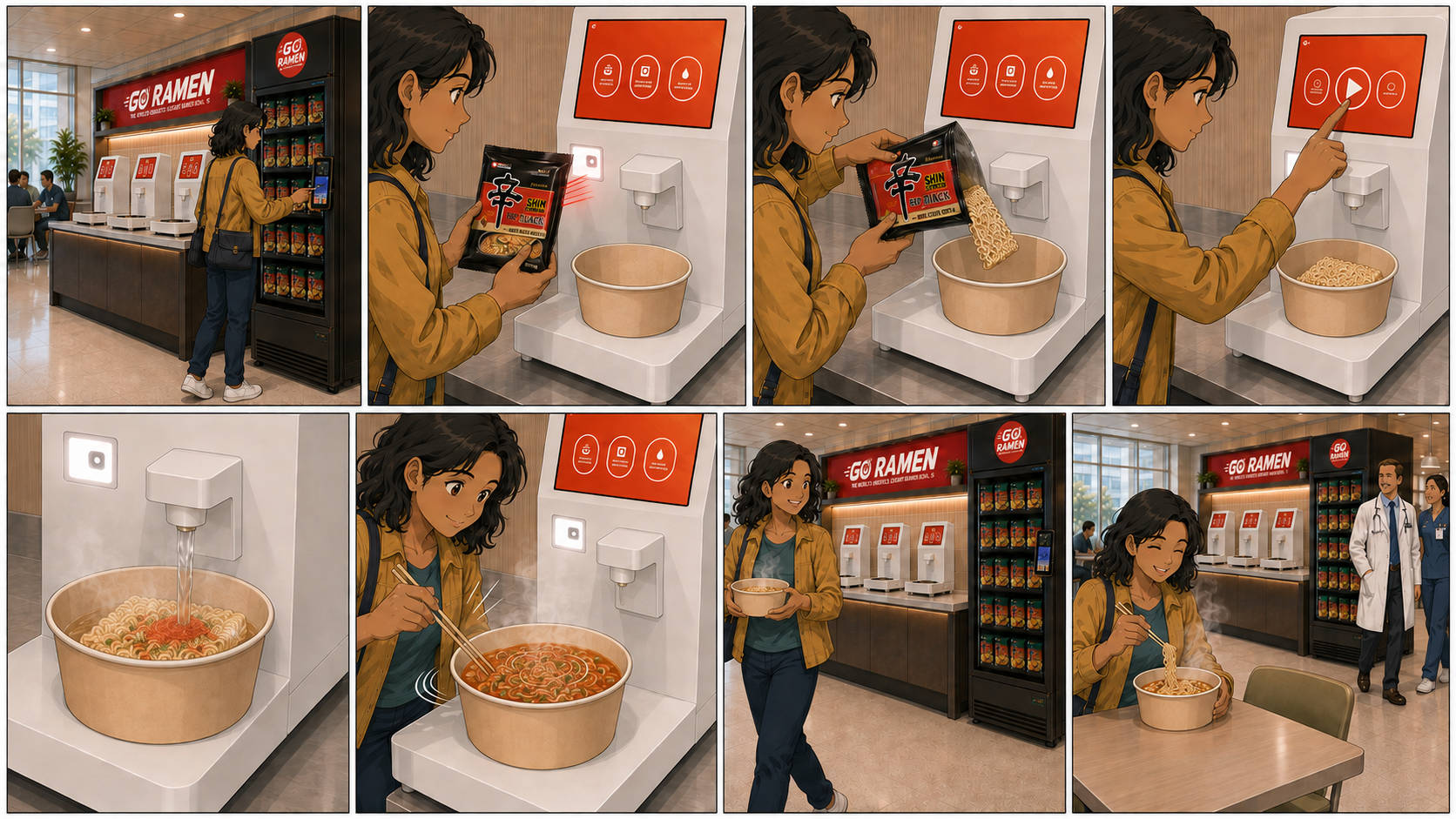
Read the illustrated steps
- Choose your noodles at the vending machine.
- Scan your product or press Instant Cooker if Wi-Fi is down.
- Place the noodles in the designated induction-compatible bowl.
- Follow the few instructions on the screen to move forward.
- The cooker adds water and heats the bowl. Instant Cooker uses two cups of water instead of the recipe-specific amount.
- Stir only when prompted by the station.
- Wait for cooking to finish before carefully collecting the hot bowl.
- Take a seat and enjoy.
Follow the instructions on your actual station and product. Do not microwave induction-ready bowls. If equipment appears unsafe, stop using it and alert venue staff.
REFUND REQUESTS START HERE
Start at the machine.
We’ll help you find the way.
For every refund request, first scan the QR code on the vending machine and choose Refund. The website form below is intended as a secondary backup for unusual situations or when you could not finish the machine process.
Scan the machine QR
Use the QR label marked Activate/Restock/Refund on the vending machine.
Choose Refund
On the “Please select after-sales service type” screen, choose Refund.
Find your transaction
The “Please select after-sales order” screen offers “Search by shopping bank card number.” Follow the machine provider’s instructions to locate the transaction and submit your request for review.
Keep payment verification in the machine provider’s own secure flow. Check the provider page before entering payment details. Never put full card numbers, CVV, PINs or credentials in this website form, email or chat.
Refund requests are reviewed. Eligibility, amount and timing are not guaranteed. This website does not issue refunds or process payments.
After trying the QR flow, review the backup formPAYMENT OR MACHINE ISSUE REPORTS
A backup for
unusual situations.
First try the machine QR refund process. This secondary form is for explaining an unusual situation, including that you already submitted through the provider or could not finish its process. Include only the location, machine ID, date and a nonpayment reference.
About refund requests
You may see a temporary card authorization hold, generally $5–$10. That amount may differ from the price of your purchase and is not necessarily your final charge.
Your final charge reflects the items you purchased. The temporary hold is released as the transaction is processed; when that change appears depends on your bank or card provider.
If your final, settled charge appears incorrect, use the machine QR refund process above to request a review.
This form emails our team for review. Sending a backup request does not replace the machine provider’s refund process or guarantee a refund. Keep your request reference if delivery is unconfirmed.
A backup request would still need review. No refund eligibility, amount or timing is promised.
You may see a temporary card authorization hold, generally $5–$10. That amount may differ from the price of your purchase and is not necessarily your final charge.
Your final charge reflects the items you purchased. The temporary hold is released as the transaction is processed; when that change appears depends on your bank or card provider.